Keep what a chat learned
A chat often settles something worth keeping, such as a new date or who owns a task. Review for Brain finds those things and suggests how to update your notes.
Open Review for Brain
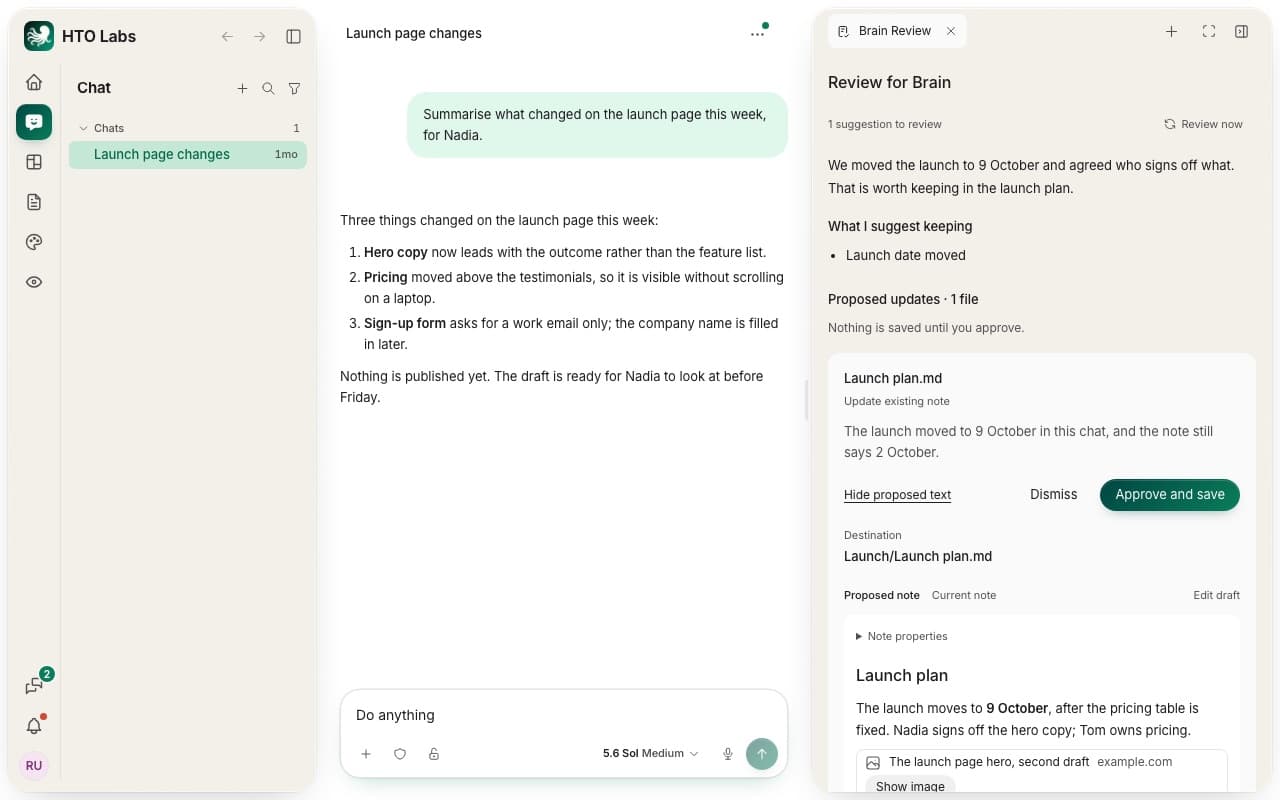
A dot on ··· at the top of a chat means suggestions are waiting. Press ··· and choose Review for Brain. The review opens in the panel beside the chat. Press Review now to look at the latest messages again.
Approve or dismiss
The review explains what the chat was about and lists What I suggest keeping. Under it, each suggestion shows the note it changes, or says it makes a new note.
Press Compare proposed text to see the note as HTO would write it. Proposed note and Current note switch between the new text and the note as it is today.
Edit draft lets you change the words before you save.
Press Approve and save to write the note in your Brain, or Dismiss to drop it.
Automatic review
HTO reviews a chat by itself after a milestone, after 5 new messages or after 10 minutes of new work. You switch this off with Automatic review at the foot of the panel. Tick Exclude this chat to keep a chat out of every review. Saving always needs your approval.
Still stuck? Write to us, and a person at HTO & Beyond answers.