Help · Chat · 2 min read
Find, pin and share your chats
Your chat list holds all your chats in this workspace. The chats of your pages, Workrooms and Studio items are there too, in groups of their own.
Find a chat
The list puts Pinned chats first, then Chats, then groups such as Workrooms and Pages. Press the magnifier at the top of the list to search your chats. The funnel beside it shows one kind at a time: Chats, Workrooms, Pages or Studio.
The chat’s menu
Press ··· at the top of an open chat.
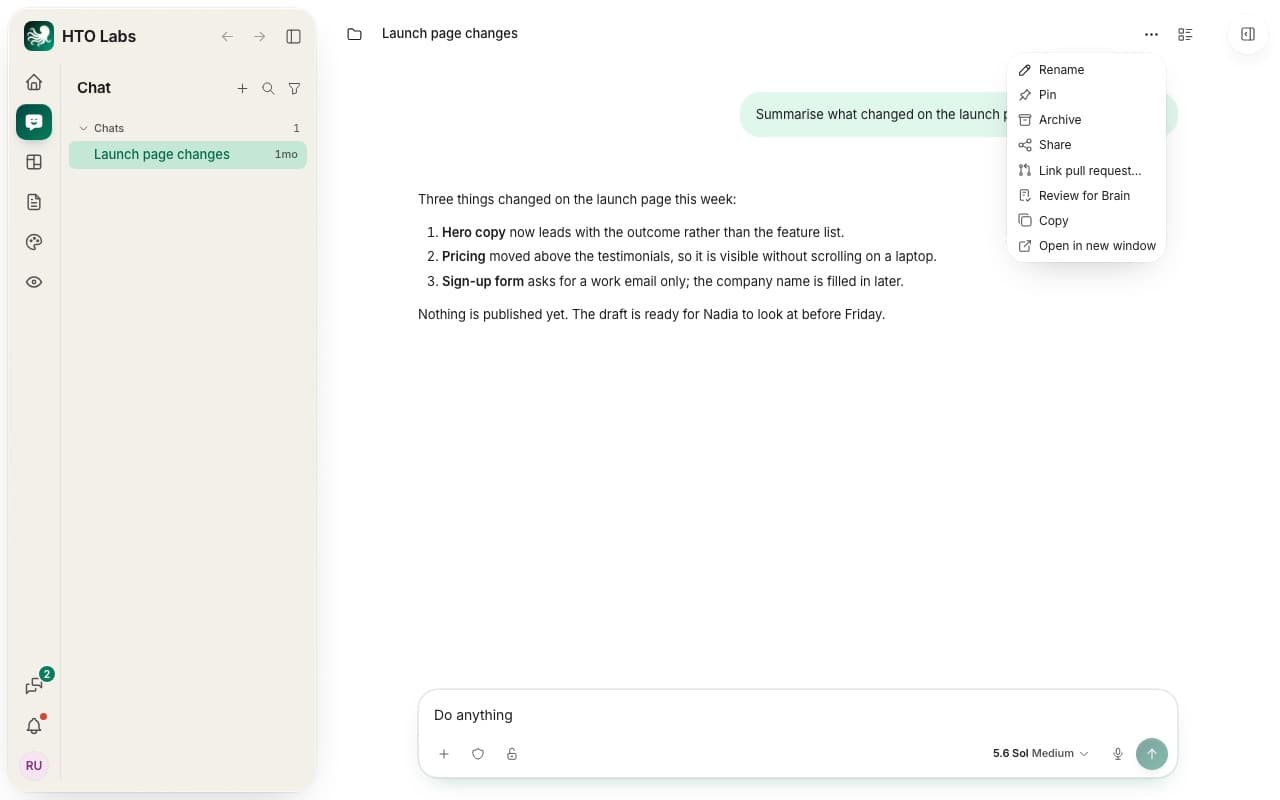
- Rename gives the chat a name you will recognize.
- Pin keeps the chat at the top of the list.
- Archive moves the chat out of the list. You find it again in Settings › Archive, where you restore it or delete it. HTO Labs deletes an archived chat after 30 days.
- Review for Brain suggests what to keep from the chat. Read Keep what a chat learned.
- Copy copies the whole chat as text.
Share a chat
Press Share in the menu. Download chat saves the conversation as a file you can send to anyone. Copy local link copies a link that opens the chat again on your own Mac. Other people cannot open that link.
Still stuck? Write to us, and a person at HTO & Beyond answers.